
Does having a Zoom link mean you're allowed to skip the courthouse? For a parent preparing for a divorce or custody hearing, that assumption can create a serious problem.
Harris County family court remote hearing rules make remote access a court-specific decision, not something you can choose because video would be easier. For families in Humble, Atascocita, Kingwood, and Northeast Houston, the safest approach is to confirm the assigned court, document the request and any required agreement, and prepare for the hearing format the judge authorizes.
Remote Hearing Rules at a Glance
Remote appearance by situation
| Situation | Remote Allowed? | What Governs It |
|---|---|---|
| Non-essential family matter | Only with agreement from all parties, scheduled after the respondent appears and any required mediation is scheduled | Harris County Family Trial Division rules and the assigned court |
| Hearing involving testimony | Generally not required to be electronic unless the parties agree or the court finds good cause | Family Trial Division rules |
| Participant lacks reliable internet, camera or privacy | Not automatic; raise the problem before the hearing and provide supporting information | Judge's instructions and local rules |
| Protective-order matter with sexually explicit evidence | Electronic transmission is limited unless required parties give notice and express consent | Texas Government Code section 21.014 |
| Uncontested divorce finalization | Court-specific options include a filed affidavit of prove-up, Zoom appearance or uncontested docket | The assigned court's current procedures |
The short answer is that in-person attendance is the starting point, and electronic participation requires court authorization after appropriate notice. A request, an agreement between parents, and an approved remote setting are different things.
The Texas Judicial Branch's Harris County local-rule listing identifies Family Trial Division rules posted December 31, 2022, and a later local-rules document posted July 16, 2025. These published documents matter because remote hearings operate within formal court procedures, not an informal arrangement between people who happen to have Zoom.
Permission and privacy are separate questions
Agreement may support a remote request, but it doesn't remove the judge's control over the setting. Likewise, a hearing that works well for a scheduling discussion may not work well when witnesses must testify or disputed documents must be examined.
Protective-order proceedings require particular care. The statutory restriction identified in the table concerns specified matters involving sexually explicit evidence, not every protective-order hearing. Don't assume that access to a meeting permits recording, broadcasting, or distributing sensitive material.
For background on the equipment and systems involved, the Ares guide to courtroom technology offers a useful technology overview. Treat it as context, not as authority for your Harris County setting.
Practical rule: A working connection answers whether you can join. The assigned court answers whether you may appear that way.
For a Humble parent balancing work, transportation, and childcare, remote access can be helpful. But the assigned court's procedures, hearing notice, and judge's instructions decide the outcome. A Zoom invitation alone doesn't settle those questions.
Request a Remote Appearance and Get It on the Calendar
Start with the assigned family district court, not a search for a countywide Zoom room. Find the court name on your case documents, then review its current procedures through the Harris County civil and family courts website identified by the District Clerk.
The Harris County District Clerk FAQ directs litigants to individual court procedures and explains that remote scheduling for non-essential family matters generally requires agreement from all parties, the respondent's appearance, and scheduling of any required mediation. Confirm how your court applies those conditions before choosing a date.
Identify the court and document the request
Read the hearing notice and any scheduling order together. Look for the hearing's purpose, whether testimony is expected, the appearance format, and instructions for requesting a different format.
If the paperwork is unclear, contact the coordinator with a focused procedural question. Include your case number, case style, the pending motion, and the existing hearing date if there is one. Ask whether you need to file a motion for remote appearance and how the court confirms approval.
Written communication helps keep the request precise. Instead of saying you need Zoom because travel is difficult, explain the actual barrier, such as an out-of-area work assignment, limited transportation, or a medical concern. Ask what supporting information the court requires rather than sending unnecessary private records.
For a non-essential matter, seek written agreement from every party when the procedure requires consent. If the other parent has an attorney, communicate through that attorney about the agreement. If the parent is unrepresented, don't mistake silence for approval.
Your request should make clear:
- The proceeding: Identify the motion or issue you want heard.
- The proposed format: Explain who would appear remotely and whether witnesses are involved.
- The parties' positions: Preserve written consent, an objection, or your unanswered request.
- The practical barrier: Describe the access problem and ask how to document it appropriately.
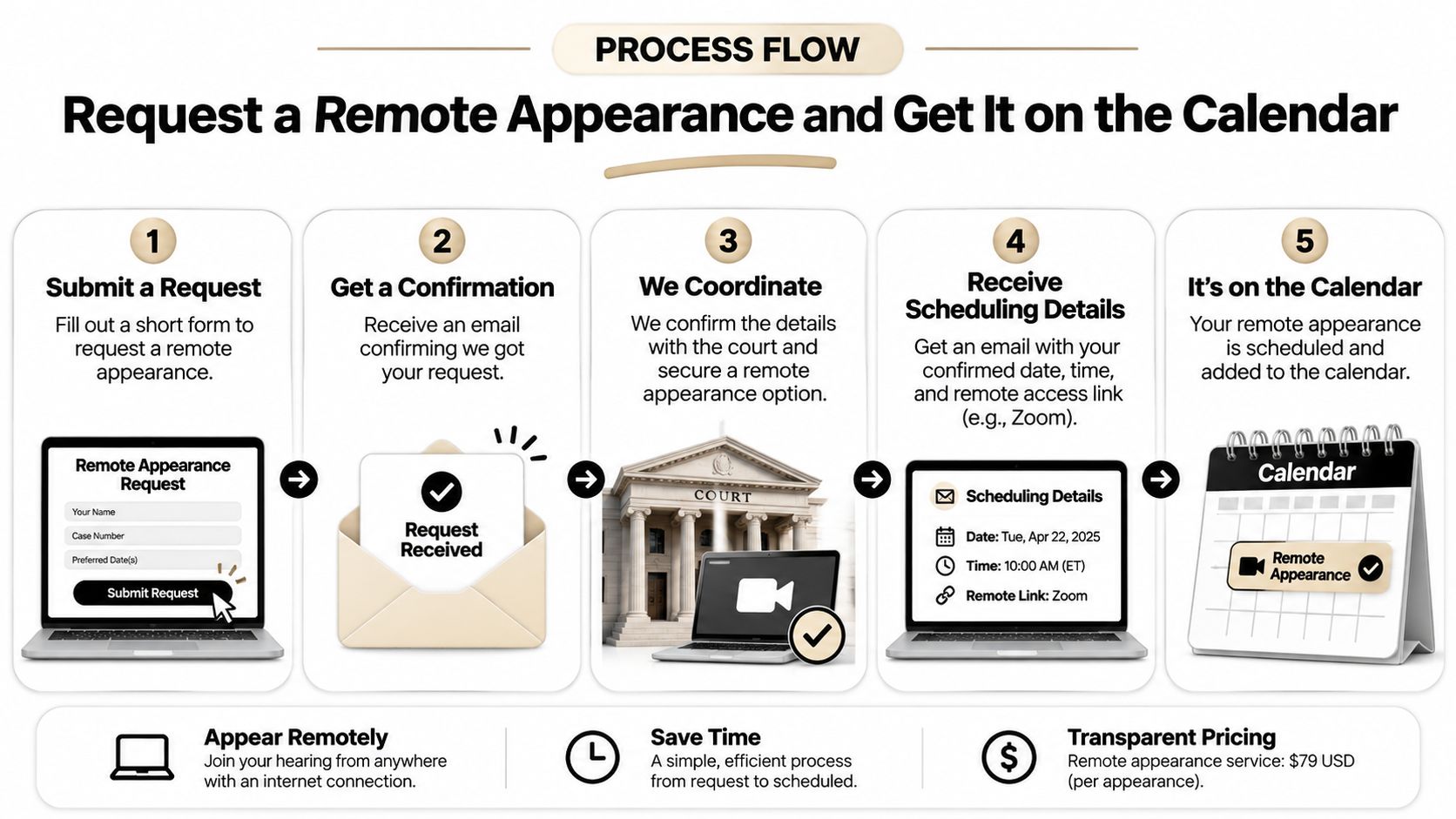
Use eHearing only where the court participates
The District Clerk's eHearing instructions list the 245th, 257th, 309th, 310th, 312th, and 507th District Courts as participating family courts. The instructions require an electronically filed motion and a District Clerk website login using the same email address used for that filing.
The electronic sequence is straightforward, but each action serves a different purpose:
- File the motion electronically. The scheduling tool connects the request to a filed motion.
- Open My Filings. Locate the motion under the account associated with the filing email.
- Select the gavel icon. Enter the hearing-request information and choose an available calendar date.
- Submit the request. The system sends a tentative Notice of Hearing for clerk review.
- Wait for confirmation. The clerk processes and records the hearing time, and the filer should receive a file-stamped confirmation by email for notifying the other parties.
Selecting an available date isn't the same as securing a confirmed setting. Don't arrange witnesses around a tentative calendar selection without checking its status.
Also, eHearing is a scheduling mechanism. Don't assume that using an electronic scheduling system means the eventual hearing will be conducted electronically. Confirm the appearance format separately.
Resolve objections and missing information
For a court that doesn't use eHearing, ask the coordinator how to request a setting. Obtain current meeting details through the court's designated process rather than recycling an invitation from a previous hearing.
If the other parent objects, send an accurate record of the disagreement through the appropriate procedure. The coordinator can explain scheduling requirements, but the judge decides disputed requests. Don't ask court staff to give legal advice or predict how the judge will rule.
If no one responds, follow up while continuing to prepare for the existing setting. An unanswered request doesn't cancel a hearing. Our explanation of how to work with a Harris County family court coordinator to get a hearing date can help you organize that communication.
Keep a hearing folder containing the filed motion, parties' responses, clerk confirmation, court authorization, current access instructions, and documents still requiring filing. Save the coordinator's contact information somewhere you can reach without opening the video application.
That organization is especially helpful when you're coordinating a hearing from Atascocita or Northeast Houston while also managing school pickups and work. It separates what you've requested from what the court has approved.
When a Judge Can Require an In-Person Hearing
Say a Kingwood parent joins an authorized Zoom hearing from a home office. During testimony, the connection drops, answers become incomplete, and the judge can't tell whether everyone heard the same question. The judge must decide whether continuing remotely would allow a fair, usable hearing.
The Harris County Family Trial Division rules give the court authority to reject or terminate an inadequate electronic format even after proceedings begin. The same rules generally prohibit requiring a party or lawyer to appear electronically for testimony unless the parties agree or the court finds good cause, so the format question runs both directions.

Why testimony changes the calculation
A remote connection must do more than transmit sound. The judge needs to evaluate testimony, address objections, and ensure that a witness can identify the document being discussed.
A frozen image or missing audio can interfere with those tasks. So can uncertainty about whether a witness is receiving messages or whether everyone has the same exhibit. That doesn't make remote testimony unsuitable, but it explains why the judge retains control.
If the court ends the remote format, it may require an in-person appearance after giving notice to the parties. That notice is your cue to get specifics in writing: the new date and time, whether the hearing restarts or resumes mid-testimony, and what happens to exhibits already submitted. Treat the switch as a new setting to prepare for, not a same-day scramble.
Build a realistic physical-attendance backup
Request approval early and preserve it in writing. Confirm whether the hearing involves witnesses, exhibits, or only argument, because that affects both preparation and the court's assessment.
Your backup should address practical obstacles:
- Transportation: Identify how you would reach the courthouse if the setting changes.
- Family responsibilities: Arrange an alternative for childcare or school pickup.
- Access limitations: Explain unreliable internet, a broken camera, or lack of privacy before the hearing.
- Supporting information: Keep relevant error messages, equipment details, or other documentation the court requests.
Raising a problem early gives the court an opportunity to address it. Hoping the judge will accept an unusable connection leaves you with fewer workable options.
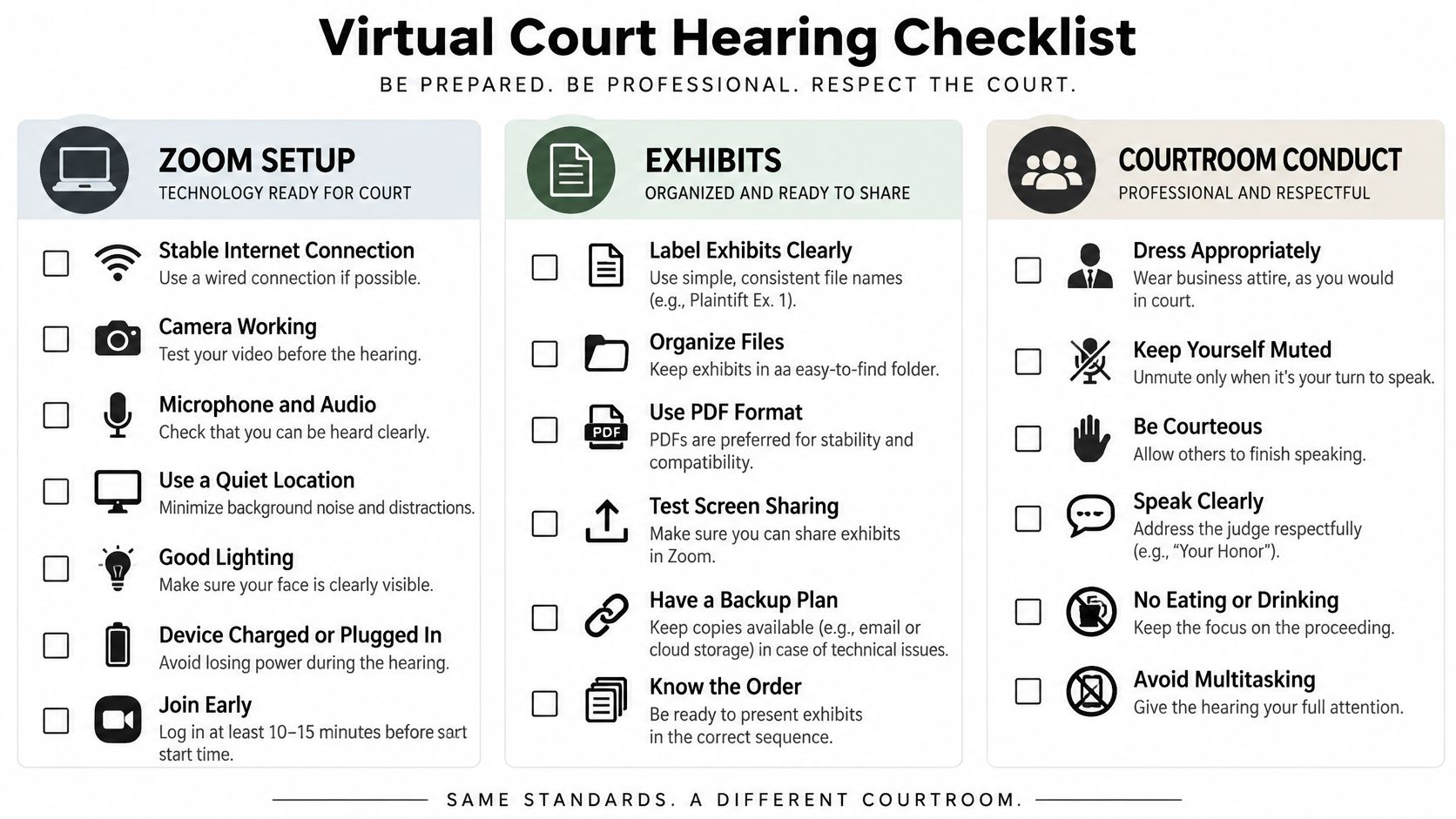
Zoom Setup, Exhibits and Courtroom Conduct
Zoom hearing deadlines and timing
The published Harris County remote-hearing guidance requires entry into the waiting room at least 10 minutes early and exhibit submission to the court reporter three days before the hearing; it also advises contacting the coordinator at least one day before if joining information hasn't arrived.
| Timing | Requirement | Why It Matters |
|---|---|---|
| Before the hearing starts | Enter the waiting room at least 10 minutes early | Lets the court admit you without delay |
| Three days before the hearing | Submit exhibits to the court reporter | Gives the court time to review and display them |
| Any time before the hearing | Resolve technical problems in advance | Unresolved issues may cause the hearing to be passed |
| During the hearing | Stay muted when not speaking and avoid distractions | Keeps the proceeding orderly and audible |
Check the assigned court's current instructions for submission methods and any additional requirements. Don't assume that filing a document and delivering a hearing exhibit are interchangeable tasks.
Follow courtroom conduct on camera
The guidance treats a remote hearing as a court proceeding, including these restrictions:
- No recording or photography: Unauthorized recording may be treated as contempt.
- Mute when listening: Avoid interruptions, background conversations, and distractions.
- Courtroom appearance: Dress and behave as you would in the courthouse.
- No witness messaging: Don't use chat to communicate with a witness or with a client who is testifying.
Test the whole setup
Use the device and location you intend to use for court. Test the camera, microphone, connection, and document display together, not as unrelated checks.
Open your proposed exhibits and make sure the text is readable. Plug in your charger, silence notifications, and choose a private room where other people won't overhear testimony. Keep telephone access available as a contingency, but ask before treating a phone connection as an authorized substitute.
For general platform comparisons, Tech Today's best video conferencing software for 2025 provides background. The court chooses the platform, however; if you receive a Teams invitation instead of Zoom instructions, confirm the platform and access details with the coordinator.
Our guide to what happens at a family court hearing in Harris County can help you prepare for the proceeding beyond the screen. Run the full technology check the day before, and don't remain silent about a missing invitation because the court may proceed without your input.
Three Local Scenarios and What Happens Next
An Atascocita parent uses an old invitation
An Atascocita mother opens the Zoom invitation saved from an earlier case, and it does not connect her to the scheduled hearing. She nearly misses the setting while trying to determine whether the problem is her device or the invitation. Her better course is to identify the assigned court and obtain current meeting information before hearing day.
The practical lesson is to save more than emails. Label the confirmed invitation with the case number and hearing date so an outdated message does not look equally reliable.
A Humble father encounters an objection
A Humble father requests a remote setting for a custody matter because attending from work would be easier, but the other parent objects. He keeps the written objection and asks how to present the disputed request instead of announcing that he will appear by video anyway. While the court decides, he prepares for an in-person setting.
Easier attendance gives the court a reason to grant the request. The judge's ruling is what approves the format. A Kingwood parent whose co-parent signs a written agreement has a different problem entirely: there is no dispute to argue, but the agreed request still needs the coordinator's access details and the court's sign-off before video is a real option.
A Humble couple doesn't need a video hearing
A Humble couple preparing to finalize an uncontested divorce assumes they need a Zoom invitation. Their assigned court's procedures instead call for a filed affidavit of prove-up, so they focus on the required documents rather than video access. They still check that the final paperwork is complete.
The District Clerk's divorce-finalization guidance explains that court-specific options include an affidavit of prove-up, a Zoom appearance, or an uncontested-docket hearing. Completing a case without a video appearance doesn't eliminate its filing requirements.
Each fix starts the same way: with the assigned court's own procedures, confirmed before the hearing date.
When to Call a Humble Family Lawyer
Does uncertainty about the hearing format put your ability to participate at risk? Call before the date. A missing approval, disputed consent, or unexplained switch back to an in-person setting deserves attention while there is still time to address it.
Legal help is especially useful when the hearing combines testimony, disputed exhibits, and unreliable technology. Those issues shape what the judge can hear, what the other side can challenge, and how clearly your position comes through.

Match the urgency to the risk
A routine question about where to find a meeting invitation may be resolved through the coordinator. A disagreement over whether a parent must testify remotely, or whether sensitive protective-order evidence can be transmitted, calls for a legal assessment.
Do not wait until the hearing begins to explain that you cannot testify privately from home. If the coordinator has not supplied access details or the judge changes the setting, get help understanding the immediate procedural step instead of guessing. The assigned court and its procedures control the practical answer, so a remote setting should be confirmed in writing before you rely on it.
The Law Office of Bryan Fagan serves clients in Humble, Atascocita, Kingwood, and Northeast Houston, as well as throughout Harris County and the Houston metropolitan area. During a free consultation, the client receives a confidential review of case details, honest feedback about legal options and potential outcomes, guidance on relevant Texas family, estate, or criminal law, and clear direction on what to do next.
Bring documents that answer the immediate question
Bring the signed court order, hearing notice, pending motion, relevant orders, and correspondence about appearance format. The signed order comes first because it shows the support amount, due date, medical support terms, and any prior arrears findings. Our guide on preparing for a consultation with a family lawyer can help you organize the discussion.
For broader procedural context, Harris County Family Courts: A Humble Resident's Guide explains how family law cases proceed in the courts serving Humble. Online research should be used carefully, since general descriptions of a firm such as entity markup for local firms do not replace the court's instructions for a hearing.
Private representation can include preparation of testimony, exhibits, and requested remedies for the hearing. A short consultation can show whether the problem is an access issue, an exhibit issue, a testimony issue, or a setting that needs an in-person backup. You can schedule by calling (281) 817-1827, reaching out online, or stopping by the Humble location. You do not need to solve every procedural issue before calling. A court-specific plan can make a remote hearing manageable without promising that the judge will approve the format you prefer.